Which one should you use?
Org Chart Studio
The pick when the chart is the deliverable.
- You want the free plan sized by chart, not by seat: up to 2,500 people.
- You want messy manager names resolved with suggestions instead of rejected rows.
- You want an export pass instead of a subscription for each editor.
Microsoft Visio
The pick when the diagramming platform matters as much as the chart.
- Your team already has Microsoft 365, so the basic Visio web app comes with it.
You need Microsoft-native breadth: floor plans, network diagrams, BPMN, or engineering drawings.
- Your sign-in and sharing already run through the Microsoft tenant.
Org Chart Studio vs Visio
| Feature | Org Chart Studio | Visio |
|---|---|---|
| Summary | ||
| Free plan | Yes (1 editable cloud chart; build to 2,500 people; watermarked PNG export free up to 25 people; CSV free) | Partial (included with Microsoft 365 commercial plans; basic diagrams; org charts only partially supported — pictures and employee fields unavailable; org chart templates start at Plan 1) |
| Subscription | $8/month or $80/year for charts up to 250 people (optional; active paid access supports up to 100 stored charts) | Plan 1 $5.00/user/mo paid yearly (web app); Plan 2 $15.00/user/mo paid yearly (web and desktop) |
| One-time export passes | Yes (one-time, tiered by size and duration; optional subscriptions also available) | No (per-user subscription or a perpetual license; no export passes) |
| CSV and Excel import | Yes | Partial (Excel, text, Exchange, or ODBC; matches the identifier you nominate) |
| Editable PowerPoint export | Yes | No (slide snippets arrive as pictures) |
| Ecosystem lock-in | None | Microsoft |
| Matrix and dotted-line reporting | Planned | Yes (manual dotted-line connectors) |
| Shareable links | Planned | Yes (OneDrive or SharePoint sharing, including people without a licence) |
| SSO / SAML | No | Partial (sign-in through the Microsoft 365 tenant) |
| Classification | System of capture | System of capture (manual) |
| Start without an account | Yes | No (sign-in to Microsoft 365 required) |
| Drag-and-drop editing | Yes | Yes (drag a subordinate onto a superior) |
| Automatic layout | Yes | Yes (auto align and space; arrange subordinates) |
| Custom fields per person | Yes (up to 5) | Yes (shape data; employee fields on the paid plans) |
| Chart branding and themes | Yes | Yes (themes on every tier; pictures in drawings) |
| Undo and redo | Yes | Yes |
| Manager names matched despite typos | Yes | No (matches the chosen identifier) |
| HRIS export detected automatically | Planned | No (worksheet, text file or Exchange source; no HRIS export format) |
| Live HRIS sync (Workday, ADP, UKG, etc.) | No | No |
| Spreadsheet re-import with a review | Yes | Partial (linked-data refresh with conflict resolution) |
| Free exports | Yes (CSV free; watermarked PNG up to 25 people; clean PNG, PDF, and PowerPoint need a pass or subscription) | Partial (bundled tier saves PNG and JPEG; requires a Microsoft 365 subscription) |
| PNG export | Yes (watermarked free up to 25 people; clean PNG needs a pass or subscription) | Yes |
| Vector PDF export | Yes | Yes (desktop Visio) |
| CSV / data export | Yes | Partial (desktop exports organization data to Excel or text) |
| Embed on a page | Planned | Yes (embed code for a web or SharePoint page) |
| Agent / MCP / API access | Yes (MCP, llms.txt, OpenAPI) | Partial (Office add-in JavaScript API documented for Visio on the web; no REST/Graph diagram API or MCP server found) |
| Max people per chart (self-serve) | 2,500 people per chart (default build ceiling; export-size tier is separate) | N/A (general canvas) |
| Position/vacancy management | Yes | Partial (shapes can stand for vacancies; no position tracking) |
| Workforce planning scenarios | Partial (separate charts with active paid access; custom cost fields; CSV export for spreadsheet totals; no built-in scenario comparison or cost rollups) | Partial (restructuring and planning diagrams; no headcount or cost rollups) |
| Admin/permission groups | No (no sharing, invite, or permission-management surface) | Partial (tenant-level licensing and access, administered in Microsoft 365) |
| SOC 2 | No | Yes (Microsoft) |
Layout and theming
In Org Chart Studio a theme is one setting that carries card styles, colors, type, avatars, and connectors across the chart. Rebuild the chart from a new roster and the look comes back with it, which is the difference between an org chart you maintain and one you restyle each quarter.
Visio's themes apply to a page or a whole drawing in one click, and on Plan 2 the shape data behind each card can drive data graphics. Visio's canvas is built for many diagram types, so the org chart shares its styling controls with floor plans and network diagrams rather than owning them.
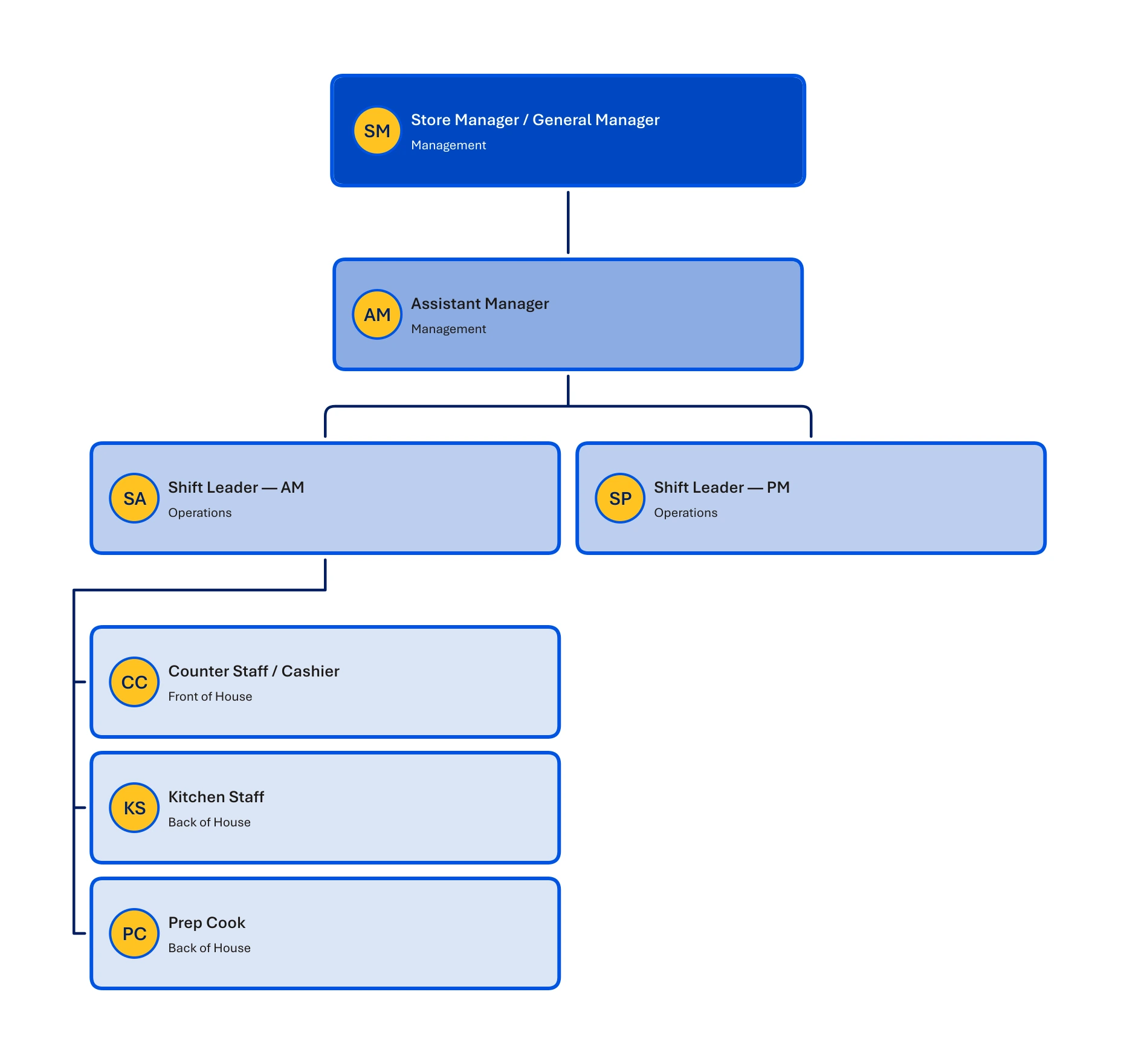
One theme, applied across the chart
Org Chart Studio’s Mart theme, with teams stacked in a compact arrangement that keeps the whole chart easy to scan.
Where Org Chart Studio is the better pick
The free plan is sized by chart, not by seat. Start without an account and build to 2,500 people per chart. A new free account includes one editable cloud chart; an active pass or subscription supports multiple stored charts. When a pass expires, choose one chart to keep editable and the others are read-only. See current chart and export options. The free PNG export is watermarked and covers charts up to 25 people, and CSV export is free. Visio sells its paid plans per user instead, and the entry plan buys the web app alone.
Import that expects a messy roster. When a manager name does not line up exactly, Org Chart Studio proposes the nearest matches with a confidence score, and the rows it cannot resolve collect in a Needs manager list you work through before the chart builds. Visio's desktop Organization Chart Wizard reads an Excel worksheet, a text file, an Exchange directory, or an ODBC source, and its reports-to column has to carry each manager's unique identifier. Microsoft documents that rule; it documents no typo tolerance and no candidate suggestions.
Re-import as a review. Re-importing a roster asks which changes to apply: added, removed, updated, and moved people arrive grouped, and removals are opt-in. Visio's data story lives in the desktop app, where the wizard can compare a drawing with an external source and Plan 2 keeps shapes linked to Excel with a two-way sync. Microsoft documents no review of individual changes.
An editable PowerPoint. Our PPTX export is shapes and native text, so a late correction happens in the deck. Visio's Plan 2 slide snippet export puts pictures of the diagram on the slides, so moving one box means going back to Visio.
Where Visio is the better pick
The basic web app is already paid for. Visio in Microsoft 365 is included with Microsoft 365 commercial and education plans, and Microsoft lists basic organization charts among the diagram types it covers there. The tier leaves out pictures and employee fields on org chart shapes, and the full data features sit in Plan 2, but for a small chart in a Microsoft shop the extra cost is nothing.
Microsoft-native breadth. Plan 2 adds the Windows desktop app, more than 250,000 partner-created shapes, floor plans, engineering and P&ID drawings, BPMN 2.0, and data connectivity that links shapes to Excel, SharePoint, SQL Server, or Azure Active Directory. That is a wider tool than an org chart maker, and priced as one.
The chart arrives where the team already works. A Visio diagram can sit as a tab in a Teams channel or chat, and co-authoring, comments, and presence are in the browser app on every Visio tier.
What each one costs
Org Chart Studio charges for the export pass, with no editor seats to buy. Building is free up to 2,500 people per chart, and clean exports are a one-time purchase. The annual pass is $100 for charts up to 250 people and covers clean PNG, PDF, and PowerPoint; other pass sizes and durations are priced by how many people are in the chart. The pass tiers and a plain-English explanation of how passes work are both on the site.
Visio is a per-user subscription, and the two paid editions are easy to confuse. Visio Plan 1 is $5.00 per user per month, paid yearly, and it is the web app only. Visio Plan 2 is $15.00 per user per month, paid yearly, and it adds the Windows desktop app, offline file support, and the data connectivity that makes a live org chart possible. Separately from both, Microsoft sells one-time-purchase desktop editions, Visio Standard 2024 and Visio Professional 2024, and the lightweight web app included with Microsoft 365 commercial and education plans is a fourth, smaller thing again. Prices and plan contents were checked against Microsoft's Visio plans page and its plan comparison on Sep 16, 2026.
The models reward different buyers. Visio licenses the people who create and edit diagrams. A pass is priced by how many people are in the chart and how long you need it.
Sharing, admin, and compliance
Visio files live in OneDrive or SharePoint, so sharing and external-sharing rules come from the Microsoft 365 tenant, and a diagram can be embedded in a web page or a SharePoint page with an embed code. Compliance review, when it happens, runs against the tenant rather than against Visio on its own, which is the shape most Microsoft shops already work in.
On our side, link sharing sits on the roadmap rather than in the product, and we ship no embed, no commenting, no SSO, and no SOC 2 report of our own. If a review asks for those, they are requirements, and Visio is the relevant option in this comparison.
Visio alternatives
If Visio is more suite than you need, Lucidchart is the closest general diagramming subscription, and SmartDraw covers floor plans and network diagrams with a lower annual price. draw.io is the free pick for general diagramming, and the org chart software comparison covers everyone else. For the specific job of a chart you build and maintain, the choice is between a per-user Microsoft subscription and a chart that is free to build with an optional export pass.
Frequently asked questions
Yes. Org Chart Studio builds charts of up to 2,500 people for free, and the free PNG export is watermarked and covers charts up to 25 people. Visio's basic web app is not sold on its own: it is included with Microsoft 365 commercial and education plans, and Microsoft notes that pictures and employee fields are not available in that tier.
Visio Plan 1 is $5.00 per user per month, paid yearly, and Plan 2 is $15.00 per user per month, paid yearly. Plan 1 is the web app; Plan 2 adds the Windows desktop app, offline files, and data connectivity. Microsoft also sells one-time-purchase desktop editions, and the basic web app comes with Microsoft 365 commercial and education plans.
Only in the browser. Microsoft's own article states that there is no desktop version of Visio for macOS, and that Visio for the web runs in Safari or Chrome with Visio Plan 1. Org Chart Studio runs in the browser on any operating system, and Excel import works the same everywhere.
Yes, in the desktop app. The Organization Chart Wizard reads an Excel worksheet, a text file, or an Exchange directory, and every reports-to value has to match an employee's unique identifier. Plan 2 can also link shapes to data with a two-way Excel sync. The Data Visualizer add-in for Excel, which built org charts from a workbook inside Excel without a Visio license, was retired on March 2, 2026, so the current Excel routes are the desktop ones.
No. Pictures and employee fields are optional in an org chart, and Microsoft's comparison page lists them as the capabilities the Microsoft 365 tier leaves out. A chart without pictures still shows names, titles, and reporting lines, and Org Chart Studio's themes stay readable when every card is text.
When the org chart has to live inside Microsoft 365. The basic web app comes with the suite, co-authoring and comments are in the browser app, and Plan 2 adds the Windows desktop app, more than 250,000 shapes, engineering drawings, and data connectivity. Org Chart Studio is the faster path when the chart itself is the deliverable.