Which one should you use?
Org Chart Studio
The pick when the org chart is the whole job.
- You want to build the chart before you pay anything: free to 2,500 people.
- You want messy manager names resolved on import instead of an identifier rule.
- You want one theme to hold across the chart as the roster changes.
ChartHop
The pick when the chart has to keep itself current.
- You want the org chart synced from your HR or payroll system.
- You want people analytics, headcount planning, and compensation around it.
- You need SSO or a SOC 2 report for procurement.
Org Chart Studio vs ChartHop
| Feature | Org Chart Studio | ChartHop |
|---|---|---|
| Summary | ||
| Free plan | Yes (1 editable cloud chart; build to 2,500 people; watermarked PNG export free up to 25 people; CSV free) | No |
| Subscription | $8/month or $80/year for charts up to 250 people (optional; active paid access supports up to 100 stored charts) | $5/employee/mo Core, billed annually; modules $3–4/employee/mo; volume pricing available; no minimum published |
| One-time export passes | Yes (one-time, tiered by size and duration; optional subscriptions also available) | No |
| Start without an account | Yes | No |
| Manager names matched despite typos | Yes | No manager column uses the same email or custom ID as the person identifier |
| Editable PowerPoint export | Yes | Partial |
| Live HRIS sync (Workday, ADP, UKG, etc.) | No | Yes |
| Workforce planning scenarios | Partial (separate charts with active paid access; custom cost fields; CSV export for spreadsheet totals; no built-in scenario comparison or cost rollups) | Yes |
| Admin/permission groups | No (no sharing, invite, or permission-management surface) | Yes |
| SSO / SAML | No | Yes |
| Classification | System of capture | Mirror |
| Ecosystem lock-in | None | None |
| Drag-and-drop editing | Yes | Yes |
| Automatic layout | Yes | Yes |
| Matrix and dotted-line reporting | Planned | Yes |
| Custom fields per person | Yes (up to 5) | Yes (extensive) |
| Chart branding and themes | Yes | Yes |
| Undo and redo | Yes | Partial revert-only, no true redo |
| CSV and Excel import | Yes | Yes (CSV or Excel with column mapping) |
| HRIS export detected automatically | Planned | N/A (native sync) |
| Spreadsheet re-import with a review | Yes | Yes (native sync) |
| Free exports | Yes (CSV free; watermarked PNG up to 25 people; clean PNG, PDF, and PowerPoint need a pass or subscription) | No |
| PNG export | Yes (watermarked free up to 25 people; clean PNG needs a pass or subscription) | Yes |
| Vector PDF export | Yes | Yes |
| CSV / data export | Yes | Yes |
| Shareable links | Planned | Yes |
| Embed on a page | Planned | Partial |
| Agent / MCP / API access | Yes (MCP, llms.txt, OpenAPI) | Partial (API) |
| Max people per chart (self-serve) | 2,500 people per chart (default build ceiling; export-size tier is separate) | Not published; the enterprise tier scales to thousands |
| Position/vacancy management | Yes | Yes |
| SOC 2 | No | Yes SOC 2 Type 2 examination completed (charthop.com) |
Layout and theming
One theme covers the whole chart on our side: card shape, type, avatars, and connectors change together, and the theme stays on the chart when you swap in a new roster. Spacing and branch arrangement are presets, so a wide hierarchy stays readable without a manual restyle.
ChartHop’s org chart PowerPoint export offers the ChartHop default or a custom theme your organization has set up, plus slide formats and separate slides per department or team.
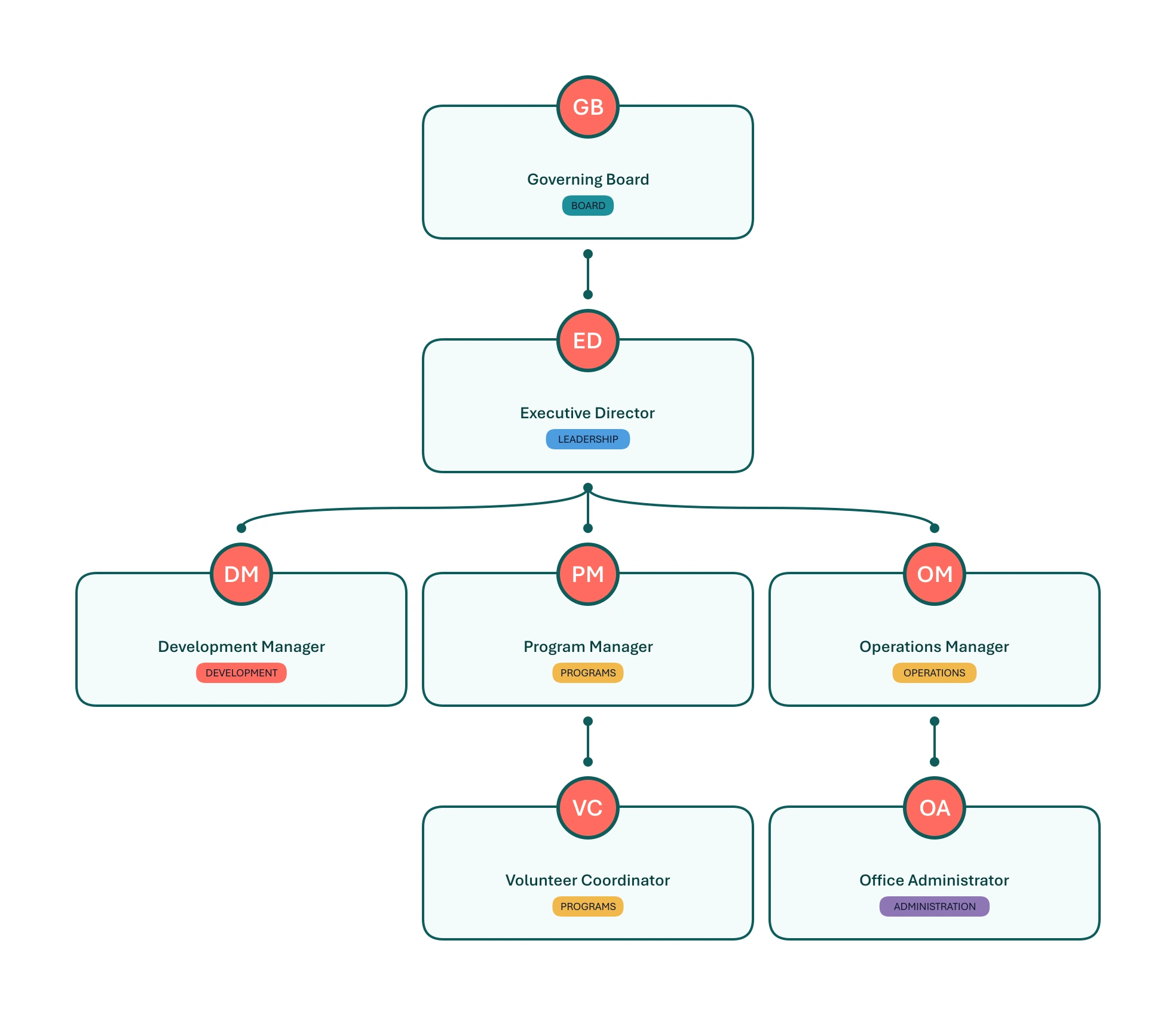
One theme, held across the whole chart
Org Chart Studio’s Tidepool theme gives this nonprofit’s chart coral accents and clear department labels, with compact spacing and reports stacked beneath their managers.
Where Org Chart Studio is the better pick
Free to build for 2,500 people per chart. Start without an account. A new free account includes one editable cloud chart; an active pass or subscription supports multiple stored charts. When a pass expires, choose one chart to keep editable and the others are read-only. See current chart and export options. ChartHop lists no free plan: its pricing page puts Core at $5 per employee per month, billed annually, and routes new teams to a demo. The watermarked PNG export costs nothing up to 25 people, and CSV export is free.
Manager matching that works on real rosters. Matching suggests the closest candidates with a confidence value rather than failing the row, and unresolved people collect in a Needs manager list. ChartHop's spreadsheet import maps your columns to its fields and identifies each row by the file's first column, usually a work email or a custom ID; the manager column has to use that same identifier.
PowerPoint that stays editable. The export is native shapes and text, so a late edit in the deck is a normal edit instead of a re-export. ChartHop exports the org chart to PowerPoint with theme, slide format, and per-department options.
Where ChartHop is the better pick
Live sync from the systems you already run. ChartHop connects to payroll and HR platforms so the org chart, map, data sheets, and reports update from the source. ADP Workforce Now is a two-way sync, and the integration list covers Workday, UKG, BambooHR, Personio, Paylocity, and more. The org chart view adds a date slider for looking at the structure in the past or ahead at planned hires. Org Chart Studio does not sync: the roster moves by file, exported from your HR system, imported here, and re-imported after changes.
Analytics and planning around the chart. Core covers people analytics, dashboards, AI insights, employee profiles, a map view, and a company calendar, and the paid modules add headcount planning, compensation, performance, engagement, and goals. Scenarios model proposed changes with cost by quarter or fiscal year. Org Chart Studio covers the planning job by hand: a separate chart, custom cost fields, and a CSV export to total the numbers.
Administration and procurement. Access roles decide who sees which data and who can import, and SSO covers SAML, Okta, Google, and Active Directory. ChartHop also reports a completed SOC 2 Type 2 examination. Link sharing on our side is still roadmap rather than shipped, and we do not offer SSO or a SOC 2 report.
What each one costs
Clean exports are where the money goes on our side: $100 buys a year of clean PNG, vector PDF, and editable PowerPoint for charts up to 250 people, and larger chart-size tiers are available. The pass price is based on the number of people your exported charts can contain. Watermarked PNGs cost nothing up to 25 people, and CSV export never needs a pass. See the full pass tiers or how passes work.
ChartHop publishes its list prices. Core is $5 per employee per month, billed annually, which is $15,000 a year at 250 employees, and the modules add $3 to $4 per employee per month on top. Volume pricing is available, enterprise pricing is quoted, and no annual minimum is published on the pricing page. Prices checked against ChartHop's pricing page on Sep 16, 2026.
Choose ChartHop for its connected people data and planning tools. If the job is to build, maintain, and export an org chart, Org Chart Studio gives you that without a people-platform subscription.
ChartHop alternatives
ChartHop is designed to be the visual layer on top of the HR and payroll stack, so the systems it reads from, including Workday, Personio, and BambooHR, are inputs rather than alternatives. The nearest comparisons on this site are Organimi, which pairs a chart with HR connectors on its Premium plan, and Pingboard, now sold through Workleap. For general diagramming, Lucidchart and SmartDraw cover more than org charts, draw.io is the zero-budget pick, and the org chart software comparison has the wider field.
Frequently asked questions
ChartHop Core is $5 per employee per month, billed annually, and modules add $3 to $4 per employee per month on top. At 250 employees, Core alone is $15,000 a year. Volume pricing is available, enterprise is quoted, and no annual minimum is published on the pricing page. Building and storing a chart is free here, and a year of clean exports at 250 people is $100.
ChartHop lists no free plan. Its pricing page puts Core at $5 per employee per month, billed annually, and routes new teams to a demo. Org Chart Studio builds charts up to 2,500 people for free. A new free account includes one editable cloud chart; an active pass or subscription supports multiple stored charts. When a pass expires, choose one chart to keep editable and the others are read-only. See current chart and export options. Clean exports are optional one-time passes, and subscriptions are optional for anyone who would rather renew automatically.
Yes. ChartHop imports CSV and Excel files and maps your columns to its fields. The first column identifies each person, usually by work email or a custom ID, and the manager column has to use that same identifier. Org Chart Studio imports the same CSV and Excel files and suggests the nearest manager-name matches instead.
Yes. You can build a chart up to 2,500 people here without paying anything. A new free account includes one editable cloud chart; an active pass or subscription supports multiple stored charts. When a pass expires, choose one chart to keep editable and the others are read-only. See current chart and export options. $100 covers a year of clean exports at 250 people. ChartHop's own entry point is $5 per employee per month, billed annually. draw.io is free for general diagramming.
When you need the chart to stay current from your HR system and to sit beside people analytics, headcount planning, and compensation. ChartHop syncs from platforms such as ADP Workforce Now, Workday, UKG, and BambooHR, and its scenarios model changes with cost. For a chart built and exported from a spreadsheet, Org Chart Studio is the cheaper fit.