Which one should you use?
Org Chart Studio
The pick when the org chart is the whole job.
- You want to build for free, up to 2,500 people per chart.
- You want spreadsheet import that helps resolve manager names instead of rejecting the row.
- You want editable PowerPoint, vector PDF, and clean PNG exports on a one-time pass.
Pingboard
The pick when the chart is one layer of a people platform.
- You want a directory that updates from your HR system every day.
- You want dotted lines, a teams matrix view, and private planning charts.
- You need SAML SSO, API access, or an org chart embedded on your intranet.
Org Chart Studio vs Pingboard
| Feature | Org Chart Studio | Pingboard |
|---|---|---|
| Summary | ||
| Free plan | Yes (1 editable cloud chart; build to 2,500 people; watermarked PNG export free up to 25 people; CSV free) | No |
| Subscription | $8/month or $80/year for charts up to 250 people (optional; active paid access supports up to 100 stored charts) | Platform price, no per-seat unit published: Standard starts at $4,999/year, Pro at $11,999/year, billed annually; Enterprise quoted above 250 employees |
| One-time export passes | Yes (one-time, tiered by size and duration; optional subscriptions also available) | No |
| Max people per chart (self-serve) | 2,500 people per chart (default build ceiling; export-size tier is separate) | No published chart-size cap; Enterprise is quoted for organizations with more than 250 employees |
| CSV and Excel import | Yes | Yes |
| Manager names matched despite typos | Yes | No (reporting lines keyed by work email) |
| Editable PowerPoint export | Yes | No (the documented chart download flow offers PNG or PDF only) |
| Live HRIS sync (Workday, ADP, UKG, etc.) | No | Yes (daily HRIS sync through Workleap settings; vendor pages show Workday, BambooHR, UKG Pro, and HiBob) |
| Matrix and dotted-line reporting | Planned | Yes (dotted lines and a Teams Matrix view; dotted lines cannot be imported via CSV or sync and are not included in exports) |
| Shareable links | Planned | Yes |
| Classification | System of capture | Mirror |
| Ecosystem lock-in | None | Workleap platform (HR suite account; standalone login retired) |
| Start without an account | Yes | No |
| Drag-and-drop editing | Yes | Yes |
| Automatic layout | Yes | Yes |
| Custom fields per person | Yes (up to 5) | Yes |
| Chart branding and themes | Yes | Yes |
| Undo and redo | Yes | No (no advertised chart-edit history) |
| HRIS export detected automatically | Planned | No |
| Spreadsheet re-import with a review | Yes | Yes (native sync) |
| Free exports | Yes (CSV free; watermarked PNG up to 25 people; clean PNG, PDF, and PowerPoint need a pass or subscription) | No |
| PNG export | Yes (watermarked free up to 25 people; clean PNG needs a pass or subscription) | Yes |
| Vector PDF export | Yes | Yes |
| CSV / data export | Yes | Yes |
| Embed on a page | Planned | Yes (shared org chart link inside an iframe; designed for a website or intranet) |
| Agent / MCP / API access | Yes (MCP, llms.txt, OpenAPI) | Partial (platform level: MCP access and API access are listed in Workleap's Pro plan) |
| Position/vacancy management | Yes | Yes (open roles with job titles and hiring roles with descriptions and listing links; open roles stay out of the directory, headcount, and data exports) |
| Workforce planning scenarios | Partial (separate charts with active paid access; custom cost fields; CSV export for spreadsheet totals; no built-in scenario comparison or cost rollups) | Partial |
| SSO / SAML | No | Yes (SSO listed in Standard; SAML SSO listed in Pro) |
| Admin/permission groups | No (no sharing, invite, or permission-management surface) | Yes |
| SOC 2 | No | Yes (SOC 2 Type I report, 2025; the Workleap trust center scope names Workleap Pingboard) |
Layout and theming
Org Chart Studio keeps the design at the chart level. Card style, palette, typography, avatars, and connectors follow one theme, and that theme re-applies when a new roster rebuilds the chart. Five spacing presets and five branch arrangements set the shape of the hierarchy, so nothing needs dragging into place.
Pingboard takes the other route: its card content and color coding come from directory fields, with layout and orientation as chart settings, and the hierarchy arranges itself in both products.
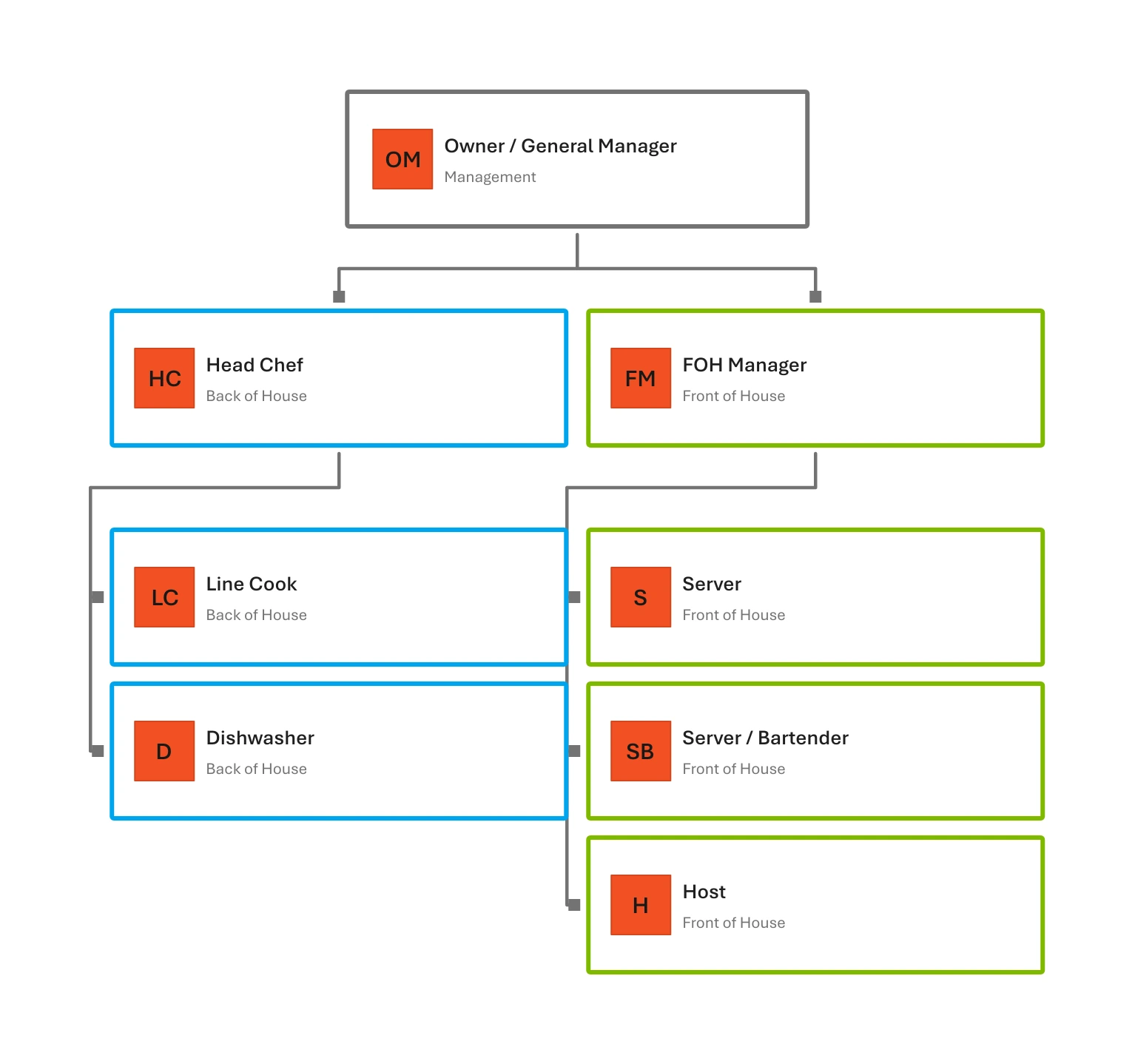
Make each department easy to spot
Org Chart Studio’s Panes theme gives each department its own color, while compactly stacked teams keep the restaurant’s reporting lines easy to scan.
Where Org Chart Studio is the better pick
Free to build, measured in people. Start without an account, build a chart up to 2,500 people, and save it once you sign in. Workleap publishes no free tier for the platform Pingboard now lives in, and every plan begins with a demo request. Watermarked PNG export is free here up to 25 people.
Import that expects a messy roster. Upload a spreadsheet and manager matching offers the closest candidate for each unresolved name, with a confidence value; whatever is left collects in a Needs manager list. Workleap's migration notes cover teams managed by hand or from an Excel file, plus a daily HRIS sync, and document no typo-tolerant matching for manager names.
Exports you can edit. One pass covers clean PNG, vector PDF, and PowerPoint in native shapes and text. Pingboard's download article offers a chart download as PNG or PDF, and its dotted lines are left out of exports entirely. When the deliverable is a deck someone else will edit, that decides it.
Scenario planning in a separate chart. Model a proposed structure in a second chart and add a cost field per person, leaving the live chart untouched while you test the idea.
Where Pingboard is the better pick
The synced directory. Pingboard's chart is a live view of an employee directory, provisioned by a daily HRIS sync from systems such as Workday, BambooHR, UKG Pro, and HiBob. If the chart has to mirror the HR system, keep it; Org Chart Studio imports a spreadsheet and does not sync with an HR system.
Dotted lines and a matrix view. Pingboard supports dotted line relationships alongside the primary hierarchy, plus a Teams Matrix view for people on more than one team. Two limits travel with that: dotted lines cannot be imported by CSV or sync, and they are not included in org chart exports. Matrix reporting is on our roadmap, not in the product.
Planning charts and roles. Planning org charts start from a copy of the live chart or a blank slate, stay private, take collaborators at edit or read-only access, and can be promoted to live. Placeholders carry a job title, and hiring roles add a description and a listing link; open roles stay out of the directory, headcount, and exports.
Sharing, administration, and access. Admins can share the live chart by link and embed it on a company site. Workleap lists SSO in Standard, and SAML SSO, API access, and MCP access in Pro. Org Chart Studio ships neither link sharing nor single sign-on; it does publish MCP and an OpenAPI-described API without a plan gate.
What each one costs
Building is free, and watermarked PNG export is free up to 25 people. Clean exports are one-time passes priced by chart size and duration, from $1 for a day at 250 people to $100 for a year at the same size; an active pass covers clean PNG, vector PDF, and PowerPoint up to its people limit. See the pass tiers or how passes work.
Pingboard is sold inside Workleap, which publishes platform plans rather than a Pingboard price or a price by chart size. Standard starts at $4,999 a year and Pro at $11,999, both billed annually, with the org chart and people directory in Standard and Enterprise quoted above 250 employees; a demo starts every plan. Those prices cover a people platform, not a people allowance for the chart, so they do not line up against a 250-person export pass. Source: Workleap's pricing page, checked Sep 16, 2026.
Pingboard alternatives
For a chart you build and export, Org Chart Studio is this page's answer. For a directory mirrored from an HR system, ChartHop plans against live people data and OrgChart charts from 50-plus HRIS connectors. Organimi and Lucidchart sit between those poles, SmartDraw covers diagramming beside the chart, and draw.io is free for general diagramming. The wider field is in our org chart software comparison.
Frequently asked questions
Yes, as part of Workleap. The standalone Pingboard login now points customers to Workleap, and Pingboard's help center lives inside Workleap's. New buyers reach the org chart and people directory through Workleap platform plans, starting with Standard.
Workleap publishes platform plans, not a per-seat Pingboard price: Standard starts at $4,999 a year and Pro at $11,999, billed annually, with Enterprise quoted above 250 employees. Org Chart Studio is free to build with, and the annual pass for clean exports up to 250 people is $100.
No free plan is published. The smallest listed plan is Standard, billed annually, and every plan starts with a demo request. Org Chart Studio builds charts up to 2,500 people for free and exports a watermarked PNG free up to 25 people.
For the chart itself, Org Chart Studio: free to build to 2,500 people per chart, with your charts saved to your account, and clean exports from a one-time pass. draw.io is free for general diagramming. No free option here syncs a directory from an HR system.
Org Chart Studio for a chart you own and export, ChartHop and OrgChart for charts that mirror HR data, Organimi and Lucidchart as middle ground, and SmartDraw where diagramming matters too. The org chart software comparison covers the rest.