Which one should you use?
Org Chart Studio
The pick when the chart is the job.
Open a browser and build, with no demo, no sales call, and no account required, up to 2,500 people per chart.
Import your spreadsheet and let manager matching resolve the typos instead of failing the rows.
Edit the theme once and reuse it, then export clean PNG, PDF, or editable PowerPoint on a one-time pass.
OrgChart
The pick when the chart has to keep itself current.
- Pull the chart from your HR system and let it refresh from live employee records.
Manage positions, dotted-line and matrix reporting, historical charts, and workforce planning in one platform.
Run an enterprise rollout, with role-based access and published security documentation.
Org Chart Studio vs OrgChart
| Feature | Org Chart Studio | OrgChart |
|---|---|---|
| Summary | ||
| Free plan | Yes (1 editable cloud chart; build to 2,500 people; watermarked PNG export free up to 25 people; CSV free) | No (no free plan; annual terms) |
| Start without an account | Yes | No (demo only) |
| Subscription | $8/month or $80/year for charts up to 250 people (optional; active paid access supports up to 100 stored charts) | From $105/mo for 100 employees charted, billed annually ($1,260/yr Core); Plus $157/mo and Pro $263/mo at that size; scales with employees charted; 1–3-year contracts |
| One-time export passes | Yes (one-time, tiered by size and duration; optional subscriptions also available) | No |
| Live HRIS sync (Workday, ADP, UKG, etc.) | No | Yes 50+ integrations |
| Manager names matched despite typos | Yes | No (matches PersonID and SupervisorID) |
| Editable PowerPoint export | Yes | No (PowerPoint export; native shape editing not advertised) |
| Max people per chart (self-serve) | 2,500 people per chart (default build ceiling; export-size tier is separate) | Unlimited (enterprise) |
| Matrix and dotted-line reporting | Planned | Yes (Plus and above) |
| SSO / SAML | No | Yes |
| Classification | System of capture | Mirror |
| Ecosystem lock-in | None | None |
| Drag-and-drop editing | Yes | Yes |
| Automatic layout | Yes | Yes |
| Custom fields per person | Yes (up to 5) | Yes (formulas, picklists) |
| Chart branding and themes | Yes | Yes |
| Undo and redo | Yes | Partial (Pro Changes panel reverts a change; no step-by-step undo) |
| CSV and Excel import | Yes | Yes (flat-file + HRIS) |
| HRIS export detected automatically | Planned | N/A (native sync) |
| Spreadsheet re-import with a review | Yes | Yes (native sync) |
| Free exports | Yes (CSV free; watermarked PNG up to 25 people; clean PNG, PDF, and PowerPoint need a pass or subscription) | No |
| PNG export | Yes (watermarked free up to 25 people; clean PNG needs a pass or subscription) | Yes |
| Vector PDF export | Yes | Yes |
| CSV / data export | Yes | Yes |
| Shareable links | Planned | Yes |
| Embed on a page | Planned | Partial |
| Agent / MCP / API access | Yes (MCP, llms.txt, OpenAPI) | Partial (API) |
| Position/vacancy management | Yes | Yes (Plus and above) |
| Workforce planning scenarios | Partial (separate charts with active paid access; custom cost fields; CSV export for spreadsheet totals; no built-in scenario comparison or cost rollups) | Yes |
| Admin/permission groups | No (no sharing, invite, or permission-management surface) | Yes (branch-level security) |
| SOC 2 | No | Yes |
Layout and theming
Org Chart Studio gives each chart one coordinated design: card style, palette, typography, avatars, and connectors. Edit it once and reuse it across charts, which is what keeps a set of org charts from looking like five people made them five ways. OrgChart is customizable in its own right, with colors, logos, pictures, filters, highlights, and formulas listed on its site.
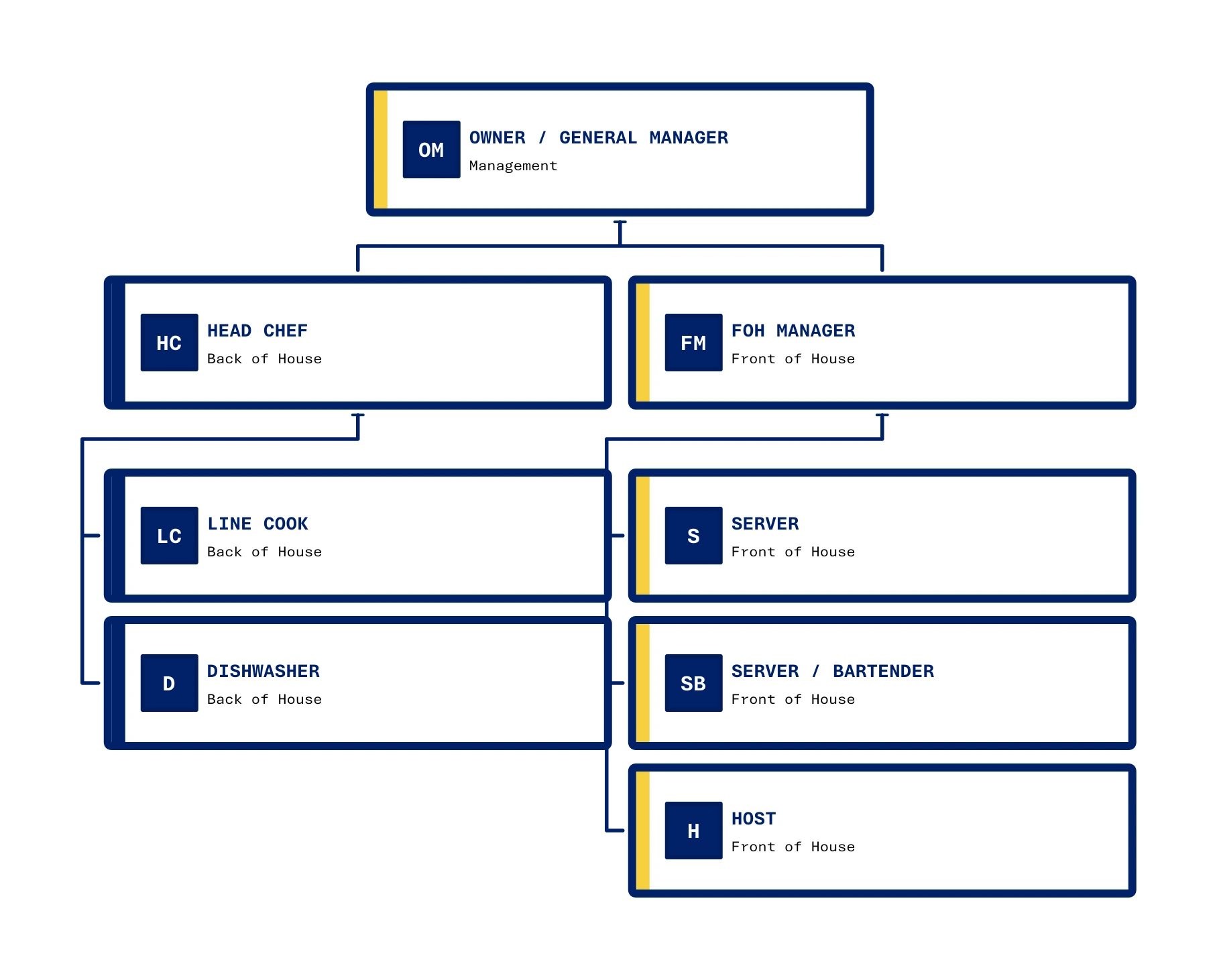
A distinctive design for the whole chart
Org Chart Studio’s Lowdown theme pairs navy outlines with yellow accents, with each team stacked neatly beneath its manager to fit the restaurant’s structure into a compact view.
Where Org Chart Studio is the better pick
A free plan measured in people. Build charts up to 2,500 people per chart and start without an account. A new free account includes one editable cloud chart; an active pass or subscription supports multiple stored charts. When a pass expires, choose one chart to keep editable and the others are read-only. See current chart and export options. Watermarked PNG export is free up to 25 people. OrgChart publishes no free plan at all: pricing terms are annual, and its site routes evaluation through a demo.
Import that repairs a real roster. Upload an .xlsx or .csv export and manager matching resolves names that do not match exactly by proposing candidates with a confidence value, and anything it cannot settle lands in a Needs manager list, so every row's state is visible before the chart builds. OrgChart's documented route is a data connection instead: 50-plus HRIS connectors, or CSV, Excel, and SFTP set up with the vendor. Its published pages do not describe typo-tolerant manager matching.
Re-import as a review, not a replacement. Upload an updated roster and Org Chart Studio groups the added, removed, updated, and moved people; you choose which changes to apply, and removals stay opt-in by default.
Where OrgChart is the better pick
Live data instead of a spreadsheet. OrgChart connects to more than 50 HR, payroll, and workforce data sources, naming ADP, Workday, UKG, Dayforce, Paychex, BambooHR, and Oracle HCM among them, and refreshes the chart from those records. Org Chart Studio does not sync with an HR system and does not claim to. If the chart has to update itself when someone moves teams, that is a real requirement and OrgChart is built for it.
Positions and planning, above Core. Position-based views, dotted-line and matrix reporting, and historical charts arrive on Plus, and workforce planning with headcount rollups and cost modeling arrives on Pro. Org Chart Studio covers manual planning instead: a separate chart for the scenario and custom cost fields per person.
The vendor is explicit about the boundary: OrgChart is not an HRIS or payroll system, and it does not replace one.
What each one costs
Org Chart Studio is free to build with, up to 2,500 people per chart. One-time export passes are priced by chart size and duration: $1 covers a day at up to 250 people, $25 covers a day at up to 2,500 people, and the annual pass for charts up to 250 people costs $100. No subscription is required. If you would rather renew automatically, optional monthly and annual subscriptions cost 20% less than the matching pass. While a pass is active it covers clean PNG, PDF, and PowerPoint exports up to its people limit. See the pass tiers or how passes work.
OrgChart sells an annual subscription priced on the number of unique employee records you chart, the package, and the contract length. Core starts at $1,260 a year for 100 employees charted, listed as $105 a month billed annually, and the price rises with the records on the chart; Plus adds position-based and matrix views, and Pro adds workforce planning. The vendor's FAQ lists one, two, and three-year terms and a 20 percent nonprofit discount. Prices checked against OrgChart's pricing page on Sep 16, 2026.
The annual pass for charts up to 250 people is $100 against Core's $1,260 starting price, and they are different purchases: a pass buys clean exports for a chart you maintain, while Core buys live HR data connections for an organization that needs the chart to update itself.
Sharing, admin, and compliance
Charts share by link and access is scoped by role. The vendor documents MFA and SSO and lists SOC 2 Type II and ISO 27001 on its security and pricing pages. On our side, link sharing is roadmap, and there is no embed, commenting, SSO, or SOC 2 report; a chart leaves Org Chart Studio as an export in PNG, vector PDF, editable PowerPoint, or CSV.
OrgChart.com alternatives
If you need the chart to mirror live HR data, the ChartHop alternative covers the per-employee planning model, and Pingboard is a synced directory with charting on top. If the chart itself is the job, Lucidchart adds diagrams beside it and SmartDraw covers diagramming with annual billing. For zero budget, draw.io is the free pick. The wider field is in our org chart software comparison.
Frequently asked questions
No. The vendor states that OrgChart does not offer a free plan and that pricing terms are annual, with its site routing evaluation through a demo. Org Chart Studio is free to build with, up to 2,500 people per chart, and watermarked PNG export is free up to 25 people.
Core starts at $1,260 a year for 100 employees charted, billed annually, and the price rises with the number of employee records on the chart. Plus adds position-based and matrix views, and Pro adds workforce planning. The vendor lists one, two, and three-year contracts. We checked those figures on theorgchart.com/pricing on Sep 16, 2026.
Yes. Org Chart Studio builds charts up to 2,500 people for free and starts without an account. A new free account includes one editable cloud chart; an active pass or subscription supports multiple stored charts. When a pass expires, choose one chart to keep editable and the others are read-only. See current chart and export options. Clean exports are one-time passes from $1, and the annual pass for charts up to 250 people is $100. Passes never renew. An optional monthly or annual subscription renews automatically at 20% below the matching pass. If you would rather place every box yourself, draw.io is free to use.
No, and it does not try to. Org Chart Studio is upload based: you import a spreadsheet and re-import the next version to review the changes. If the chart must refresh itself from Workday, ADP, or another HR system, OrgChart is built for that job and Org Chart Studio is not.
When the chart has to stay current on its own, when positions, matrix reporting, and historical charts matter, and when procurement wants a vendor with published security documentation. That is an enterprise platform purchase, and the annual contract is what it costs.